Yes. A Mac firewall can observe and enforce network policy without uploading connection records, but “local-only” must include telemetry, crash reporting, reputation lookups, update checks, accounts, and enrichment—not just the main activity database. Inspect every component that can initiate a network connection.
A firewall can see sensitive metadata
An app firewall may see the process opening a connection, its signing identity, parent or responsible process, destination address, port, transport, timing, and policy result. Depending on the protocol and inspection configuration, it may also see a hostname or HTTP request details.
That metadata can reveal which software you use, which services it contacts, when you are active, and how your local network is structured. A privacy firewall that uploads this evidence to build a prettier dashboard creates a second privacy decision.
A practical local-only firewall checklist
1. Telemetry and product analytics
Does the app send usage events, screen views, feature adoption, installation IDs, or pseudonymous diagnostics? “Anonymous” is still a network request and may still correlate with time, IP address, and device state.
2. Crash reporting
Automatic crash upload can include process state, file paths, stack traces, and hardware details. A truly strict local-only mode keeps crash artifacts local unless the user explicitly exports them.
3. Reputation and enrichment
Looking up a domain owner, IP geolocation, malware score, or file hash can disclose exactly what the firewall observed. Useful enrichment is not free from privacy cost.
4. Update checks
An automatic update request reveals that the product is installed and active. A strict passive design may require the user to open a website or download a release manually instead.
5. Accounts and cloud sync
Does the firewall require login, synchronize rules, or store activity in a hosted dashboard? If so, it is not fully local-only even if packet processing occurs on the Mac.
6. Remote lists
Subscription blocklists and remote configuration URLs are network dependencies. They can be valuable, but the product should describe when they refresh and what the request reveals.
7. Every helper and extension
Audit the menu bar helper, privileged agent, system extensions, launch daemons, and update framework—not just the visible application. One background component is enough to cross the boundary.
A VPN or transparent proxy may locally process an app’s connection and then relay that approved flow to its intended server. The key question is whether the privacy tool creates an unrelated connection of its own.
Faraday Cage’s passive-observation boundary
Faraday uses a strict rule: its UI, core service, menu helper, process monitor, and content filter do not initiate DNS, TCP, or UDP for metadata enrichment, analytics, telemetry, or updates.
The transparent proxy is the single deliberate exception. It may contact a remote endpoint only to relay an already intercepted flow after the local guard attributes the process and the policy allows the connection. That is the caged app’s approved flow, not a separate Faraday analytics request.
There is no cloud dashboard and no account requirement. Network evidence is exchanged locally between signed components over authenticated XPC.
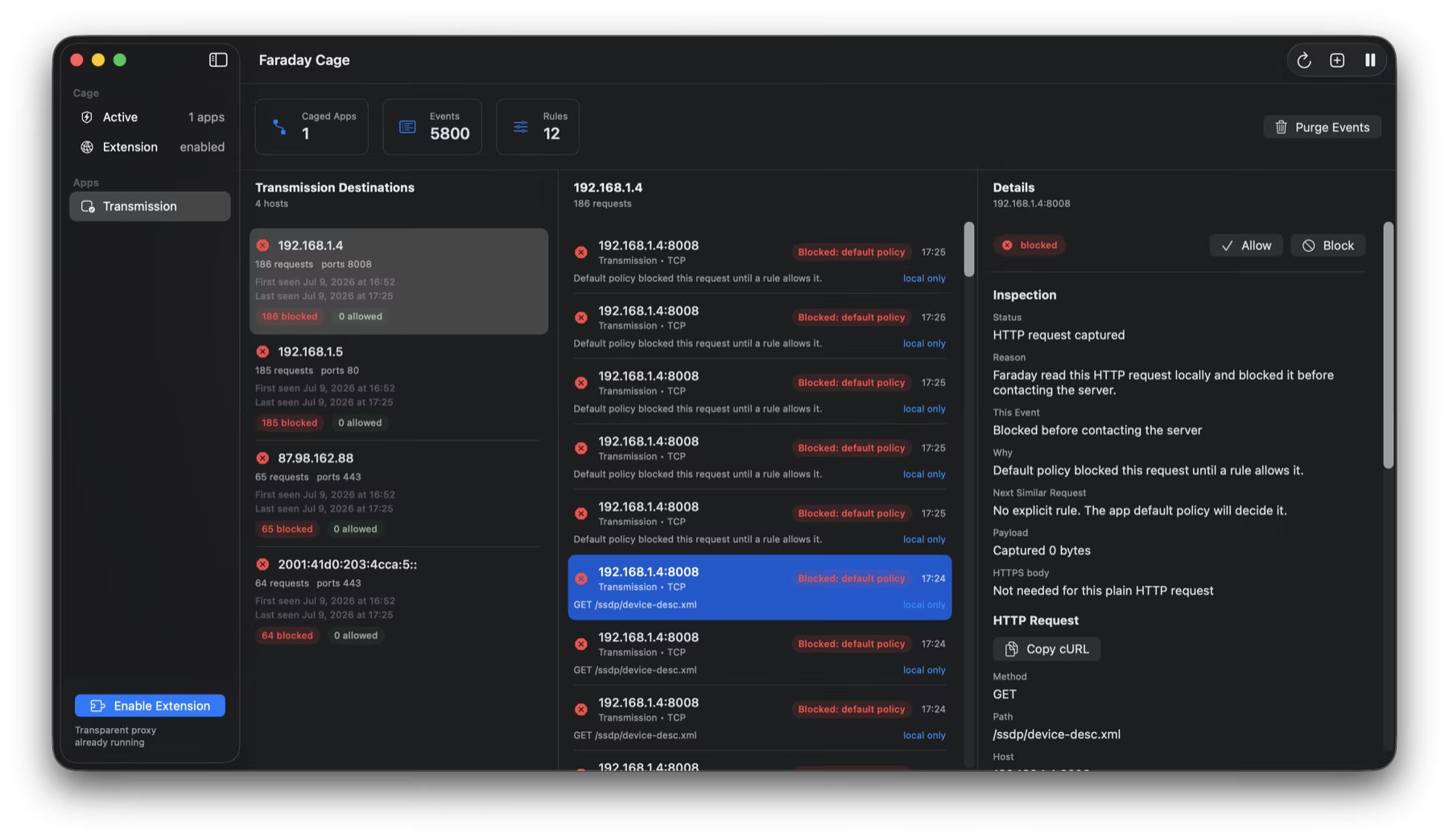
What Faraday stores on the Mac
The development architecture maintains a boot-scoped process graph and network-event history. Process identity can include audit tokens, PID versions, parent and responsible audit tokens, signing and team identifiers, executable paths, and Cage assignments. The purpose is reliable attribution and protection against PID reuse—not user profiling.
Guard state is written to a root-owned local application-support journal. Network evidence remains in local storage and is accessed by the signed Faraday components. The product does not claim that “local” means “nothing is stored”; it means storage stays on the machine unless the user exports something.
The honest limits of a local-only promise
- The operating system, uncaged apps, and allowed destinations can still make their own network requests.
- Opening a support link or sending an email leaves Faraday and uses the user’s chosen client.
- A permitted caged flow still reaches its intended remote service.
- Local administrators and software with sufficient privileges may access local logs.
- No-telemetry architecture does not prove full traffic containment; enforcement needs separate signed runtime acceptance.
Faraday build 34 has passed source and unsigned build checks, but its complete guard plane has not yet passed Apple capability approval, Developer ID signing, reboot ordering, or real Transmission acceptance. The website therefore describes those protections as implemented design under validation, not a finished guarantee.
How to verify a firewall’s own traffic
Use another trusted monitor, packet capture, or router log. Observe the firewall at idle, during launch, while opening its settings, after a rule change, and when disconnected from the internet. Look for DNS, update, crash, and analytics requests from every helper—not only the main bundle identifier.
A firewall that does not need its own exception.
Join the Faraday Cage private beta list.
Request early access ↗